Featured

Just Color Picker

Just color picker and color editor for web designers and digital artists.


Just Color Picker features:


  • Most widely-used formats of colour codes: HTML, RGB, HEX, HSB/HSV, HSL, CMYK and Delphi.
  • Averaged colour sampling for easy handling of colour noise.
  • 3x, 9x and 15x magnifier and keyboard control of the mouse cursor movements for greater precision.
  • Calculation of the pixel distance between points.
  • Colour list for saving and reusing the picked colour samples.
  • The ability to open, edit and save Adobe Photoshop .aco colour swatches (Adobe color files) and GIMP .gpl palette files.
  • Interaction with the standard Windows or Mac OS colour dialog.
  • User’s comments and notes for any picked colour.
  • Conversion of HTML/Hexadecimal and RGB colour codes into the corresponding colours.
  • Red-Green-Blue (RGB), Cyan-Magenta-Yellow (CMY) and Red-Yellow-Blue (RYB) colour wheels with marked triads and complementary colours.
  • Harmonious colour scheme generator.
  • RGB, HSV and HSL colour editors for adjusting and editing colours.
  • Gradient transition between the two colours for creating a wide range of in-between hues.
  • Text tool for evaluating the readability of the selected font and background colour combinations.
  • Optional stay-on-top behaviour.
  • User-defined hotkey for capturing colour values.
  • Copying the colour code to the clipboard with one mouse click or automatically.
  • CSS-compatible colour codes.
  • High-DPI awareness.
  • Multiple monitors support.
  • No installation required. Just Color Picker is a portable application and can be run directly from a USB stick.
  • Multilingual interface: Afrikaans, Arabic, Bulgarian, Catalan, Chinese (Simplified and Traditional), Croatian, Czech, Danish, Dutch, English, Finnish, French, German, Greek, Hungarian, Italian, Japanese, Korean, Norwegian, Polish, Portuguese, Romanian, Russian, Serbian, Slovak, Slovenian, Spanish, Swedish, Thai, Turkish, Ukrainian and Uyghur.

Perfect365


Refresh your look in one tap
  • Beautiful makeup in seconds:
    Snap. Apply. Share.
  • Try on hot new looks created by our pros, artists, and by us!
  • Pick and play! Try on natural, sweet or dramatic looks
Own your style
  • More than 20 makeup tools give you infinite design possibilities
  • A fun and simple way to have creative, full control
  • Customize and save your favorite looks

Try on makeup in REAL TIME video
  • Our new "Mirror" feature makes virtual makeup even more realistic
  • Apply a look while taking photos or video at the same time!
  • See yourself from any angle in a variety of popular looks

So accurate, it's makeup magic
  • Smart app quickly and automatically identifies key facial points
  • Detects slightly tilted heads and faces with sunglasses
  • Unique and realistic makeup application in a matter of seconds

Get the story behind each look
  • Discover the inspiration behind our makeup styles
  • Read pro tips for applying looks to your selfie
  • Learn to recreate your favorite looks IRL!

Look like a celeb in your photos
  • Upload gorgeous portraits straight to Facebook, Instagram and Twitter
  • Show off your latest fashion. Emailing pics to friends and family is easy
  • Collect your best creations and add them to the 'Favorites' folder


Funny Photo Maker


Funny Photo Maker
 helps edit photos with 300+ splendid photo framesface funartistic effects & collage, export photos in image file and GIF animation, and easily turns your photos into artistic and interesting masterpiece!


  • Rich Photo Frames: billboards, calendars, booklets, money, etc.
  • Face Fun Effects: magazines, animals, celebrities, movie stars, etc.
  • Gorgeous Artistic photo editing effects; cool Collage layouts.
  • Full customization settings; Funny Expressions.
  • Save photos on PC, share to FacebookTwitter and Flickr.


DOWNLOAD


Photoshine Mini 4.0

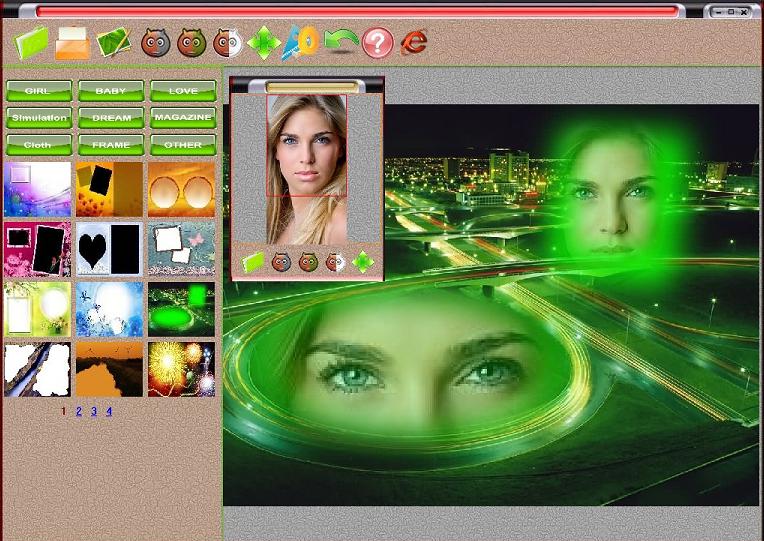
Photoshine is a photo editing and manipulation tool to easily create collages, frames and magazine style layouts with fancy effects such as sticking your favorite photograph on a cup or flower, or decorating it with a pink picture frame. Photoshine has 9 theme categories: Baby, Dream, Festival, Frame, Girl, Love, Magazine, Simulation and Other. The free version includes 230 templates while the full version comes with a whooping 680 templates. Creating a framed picture or funny effect is easy. After opening the picture in Photoshine you simply select a template to use with it. You can then fine tune it in through moving and rotating the picture within the template, for example to precisely position it within a mirror frame. You can add additional photos to the same template to create a collage. Photoshine also lets you change the color to black and white, sepia or a line drawing effect.


Magic Photo Editor

Magic Photo Editor is an easy-to-use photo editing software
Now suppose you have a digital photo and a beautiful landscape picture, and you want to add you digital photo onto the landscape picture. You want to softly blend them together, and the blended picture should be natural and attractive. You are looking for a photo editing software which can do it easily and quickly.
You can easily blend your digital photo onto another image to create special effect with Magic Photo Editor. You can also easily add many pretty frames, flowers and cartoon pictures onto your photo. It makes your photo more interesting and attractive.
You can easily change the size and position of the photos, flowers, cartoon pictures or text just by clicking and dragging them.
Give this photo editor to your girlfriend or wife. I think it makes a good present.
The features include:
  1.  There are 180 masks for you to choose, which changes your photo in different shapes then blend it onto the backdrop image
  2. Add 100 cliparts onto your photo, which make you photo more beautiful
  3. Add 180 cartoon pictures onto your photo, which make you photo more interesting.
  4. Add 60 outlines onto your photo, which make you photo more shining.
  5. Add text comments onto your photo.
  6. Add pretty frames onto your photo. There are 100 frames included.


Download

Picasa 3.9

Picasa is software that helps you instantly find, edit and share all the pictures on your PC. Every time you open Picasa, it automatically locates all your pictures (even ones you forgot you had) and sorts them into visual albums organized by date with folder names you will recognize. You can drag and drop to arrange your albums and make labels to create new groups. Picasa makes sure your pictures are always organized.
Picasa also makes advanced editing simple by putting one-click fixes and powerful effects at your fingertips. And Picasa makes it a snap to share your pictures, you can email, print photos home, make gift CDs, instantly share your images and albums, and even post pictures on your own blog.
The latest version includes Web Albums (along with other improvements), but requires that you request an account from Google.

DOWNLOAD

Microsoft Movie Maker

Windows Live Movie Maker is designed for the budding videographer. Your very own movie studio at the tip of your fingers. Quickly import your footage from your computer or camera directly into Movie Maker and then easily edit, fine tune and personalize your movie just the way you want with professional editing options or pick from a customised theme. Add a music, titles and credits and choose from a variety of effects including transitions effects, animations, zoom, pan and visual effects. Once finished, share your video with your friends and family online on Facebook, Youtube, Twitter or any other social networking site or email them the link so they can enjoy your favourite digital memories as well.


DOWNLOAD

Photo Story 3

Microsoft Photo Story lets you drag photos onto a window, arrange them as needed, then provide custom narration, transitions, zooms, pans, audio soundtracks and/or custom auto-generated music, then export the result as a WMV file.
Applying such features can prove tricky in some programs, but not in Microsoft Photo Story. The fact is, you don’t need to tweak a whole bunch of settings because the program does it for you, automatically generating transitions and zoom/pans without you having to set it up yourself. What’s more, the ones generated by default look great.
While you can simply sit back and let Microsoft Photo Story do everything for you, there’s still plenty you can play around with if you’re feeling adventurous. For instance, you can build your own custom soundtracks for your slideshow. You can pick from a bumper range of music genres, tempos, instruments and effects, giving you the chance to match the audio precisely to the mood of your show.
Output from Microsoft Photo Story is in Microsoft’s WMV file format, which is more compressed than MPEGs or other movie type files. You can choose from various resolutions in order to optimize your slideshow. Unfortunately, however, the output movies from the software are not as sharp as they’d be in VCD or DVD format.
It’s a shame that Microsoft Photo Story does’’t support burning DVDs and VCDs with the created slideshow, and you’ll need your own DVD authoring app to do this. There are applications, such as ProShow, that contain burning options and support for higher resolution output, but there’s not much that can match Photo Story in terms of its ease of use and automated features.

Downlaod

Smart Draw 21.1

Smartdraw is a downloadable Windows-based application that serves users as a functional and efficient visual processing utility.

Boasting to be the world’s first program of its type, Smartdraw enables application users to create beautifully-formatted written documentations as well as presentation-quality visuals swiftly and easily. The application prevents hassles usually related to complex graphic software as well as time-consuming, and sometimes, unsatisfactory results of inexperienced, software utilizers.

Automating the creation of these visuals, Smartdraw includes specialized templates for 70 different types of visuals ranging from flow charts to floor plans. Some of these diagrams include Activity Network, Affinity Diagram, Authority Matrix, Balanced Scorecard, BCG Matrix, Brand Essence Wheel, Calendar, Cause & Effect, Certificate, Charts & Graphs, Crime Scene, Cycle Diagram, Decision Tree, Ecomap, Electrical Diagram, Elevation, Family Tree, Floor Plan, Flowchart, Flyer, Form Designer, Funnel Chart, Genogram, Geography, Goals, Grid, Landscape, LDAP Diagram, Map, Marketing Mix, Matrix (Graph), Matrix (Table), Mechanical Diagram, Mind Map, Network Diagram, Org Chart, Pedigree Chart, Planogram, Project Chart, Project Team Chart, Puzzle Piece Diagram, Pyramid Chart, Rack Diagram, Roads & Freeways, Sales Proposition Chart, Science Diagram, Software Diagram, Step Chart, Storage Design, Storyboard, Swimlane Flowchart, SWOT Diagram, Target Diagram, Timeline, UML Diagram, Vehicle Diagram, Venn Diagram, Web Page Annotation and Web Site Map.

Smartdraw is currently available for download as a shareware.

Check out Tom's Guide for more Windows Applications andWindows Information.

And if you have any questions or need some help regarding any tech. problem you may visit the Tom's Guide forums to help you out.


DOWNLOAD

Photoscape 3.7

Looking for a program to get a fast overview of your photos and images with simple ways to optimize them? Than Photoscape is for you! The tool offers the beginner everything they need to organize and edit their digital images. Other than the viewer, Photoscape has functions to clone, crop, sharpen and decolor as well as settings for contrast, levels, vignetting and many other image parameters. Several templates allow to easily arrange photos on a page which can then be saved as a final image or be printed on paper. Photoscape also includes capabilities for red-eye removal, batch editing (file names and image settings), converting camera RAW files, taking screenshots and generating GIFs, where several individual images can be combined to an animated GIF.


DOWNLOAD

Balsamiq Mockup Maker 3.3.6

From Balsamiq Studios: Using Mockups feels like drawing, but because it's digital, you can tweak and rearrange easily. Teams can come up with a design and iterate over it in real-time in the course of a meeting.Sketchy, low-fidelity wireframes let you focus design conversations on functionality.Linking lets you generate click-through prototypes for demos & usability testing.Seamless integration with all versions of Mockups, for when you're back online.Interfaces with drag and drop components-anyone can use it.Create templates, masters, and re-usable component libraries. Mockups is designed to help you and your team or clients iterate on wireframes as early in the process as possible, when it's cheapest to do so.

DOWNLOAD

Adobe Photoshop 7.0 With Key

Adobe Photoshop 7.0.1 Update is a update package for Photoshop 7.0.1 that corrects bugs and leaves your Photoshop functioning better than ever.
After the release of any program bugs will crop up sooner or later. Even if they aren't very serious, they can still hinder your work. Photoshop 7.0.1 is no exception. Adobe Photoshop 7.0.1 Update eliminates these problems and brings improvements such as:
- Fixes scale errors
- Improves compatibility with 
QuarkXPress
- Accelerate the opening of multiple windows
- Stores JPEG metadata correctly

DOWNLOAD

Ultra Video Splitter 6.4.1208

Ultra video Splitter is a software for Windows-based computers that allows you to divide, cut, trim a large video file into smaller clips. 

This software supports different video formats like AVI, Divx, XviD, MPEG, ASF, RM, MOV, 3GP, MP4 and FLV formats. In addition, it supports splitting video to other video formats such as AVI, MPEG, DVD, WMV, MP4, H264, FLV, iPhone, PSP and PS3.

Moreover, you can extract multiple segments in different size by using the visual editing mode as well as split selection into multiple parts of equal size automatically. It also includes encoders and codec’s for easy conversion of the files.

DOWNLOAD

Adobe Photoshop CS3

Photoshop CS3 gives you the ability to work more productively, edit with unrivalled power, and composite with breakthrough tools.
New features for productivity include:
  • Streamlined interface
  • Improved Camera RAW
  • Better control over print options
  • Enhanced PDF support
  • Better management with Adobe Bridge
Editing tools new to CS3 are the Clone Source palette and nondestructive Smart Filters. Other features such as the Brightness/Contrast adjustment and Vanishing Point module were enhanced.
The Black and White adjustment option improves users control over manual grayscale conversions with a dialog box similar to that of Channel Mixer. Compositing is assisted with Photoshop’s new Quick Selection and Refine Edge tools and improved image stitching technology.

Download

Older Posts
© Copyright FIXPAK Published.. Blogger Templates
Back To Top